

Auracast™ (Bluetooth® LE Audio) enables public audio broadcasting to unlimited compatible devices, perfect for assistive listening, live event audio, interpretation, and more. But widespread adoption hinges on more than hardware. Follow this guide to ensure technical readiness, user awareness, staff support, and ongoing engagement.
1. Define Your Use Case and Technical Requirements
- Identify the primary application, e.g., assistive listening, multilingual commentary, education.
- Plan for broadcast range, audio latency, and device compatibility.
- Conduct on-site analysis to avoid interference and maximise coverage.
-
Where scale, reliability, and accessibility are critical, an Auracast™ solution such as Auri™ is often appropriate.
2. Ensure System Discoverability and User Onboarding
- Provide clear, accessible instructions for guests. Consider printed signs, digital PDFs, or QR codes.
- Include Auracast™ benefits and usage steps in pre-arrival communications.
- Train front-line staff to assist users and answer common questions.
3. Deploy Clear Signage and Branding
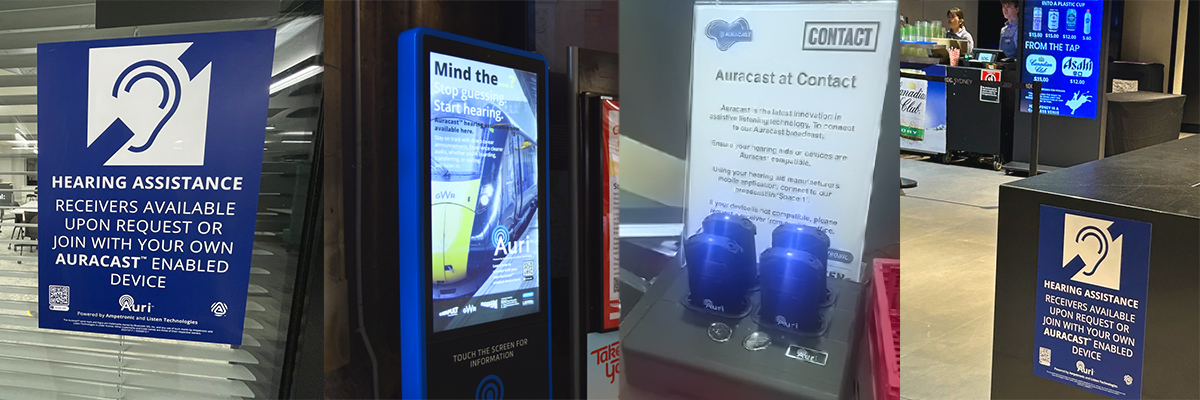
- Display prominent signs at entrances, lobbies, seating zones, and counters.
- Use compliant signage, try our free Assistive Listening Signage Generator.
- Include instructions like “Select the Auracast™ stream” and “Pair your hearing aid or device.”
4. Register Your Venue and Promote It Widely
- Complete venue registration via the Bluetooth® Auracast™ venue success page.
-
Register your Auracast™ venue and update accessibility details on Google Maps .
- Ensure your Auracast™ broadcast appears on Bluetooth-enabled device searches and online maps.
- Highlight Auracast™ on your website, app, event promos, newsletters, and social channels.
5. Train Staff and Empower Them to Support Guests
- Inform staff about Auracast™ features: how it works, supported devices, troubleshooting.
- Equip them with easy scripts: “To use Auracast™, open Bluetooth settings, select the stream name displayed on our signs, and adjust the volume.”
- Run quick practice sessions to simulate guest interaction.
6. Maintain and Scale Your Audio Infrastructure
- Plan for multiple broadcast channels if offering translation, commentary, or different content streams.
- Update signage, website, and digital materials with any new channel info.
- Keep staff refreshed through refresher training as teams change.
The Inclusive Advantage
To ensure inclusivity, Auracast™ should operate alongside existing systems like hearing loops or infrared. This multi-technology model meets today’s accessibility needs while preparing for the future.
Final Note
Rolling out Auracast™ isn’t just about adding a new audio feature, it’s about making your venue welcoming to all. With clear signage, staff support, marketing, and compliance, you’ll transform your system from unseen to essential.